Back to the OARUX homepage

Continuous UX Evals

User experience metrics
that keep pace
with your analytics.

OARUX builds checks from your own research and calibrates them against human judgment. Checks run automatically on your product’s real journeys, before release and in production, for product, design, research and engineering teams.

See how experience and product metrics move together.

Illustrative example

An IT administrator at her office desk rests her chin on her hand and frowns, hesitating over what she sees on her monitor.

Admin over-provisions permissions - why?

Workflow

Role assigned and every step succeeded. Telemetry records a success.

Workflow status: Complete

Error rate: 0%

Task outcome: Fail

The employee was granted broader access than needed.

Experience Fail

Role Clarity criterion failed: Two similar roles were shown without the permissions that set them apart.

A man on a living-room sofa at night rests his chin on his hand and frowns doubtfully at his laptop.

Customer purchased then later exchanged the item - why?

Workflow

Purchase completed and every step succeeded. Telemetry records a success.

Workflow status: Complete

Error rate: 0%

Task outcome: Success

The shopper bought a product within budget.

Later: the item was exchanged.

Experience Fail

Decision Confidence criterion failed: An option the user viewed was left unaddressed.

01 / Before & after UX Evals

Same research. Same immediate fixes.
With UX Evals, insights keep working.

Research explains why an important experience falls short. The team ships a fix. Then the product keeps changing.

Before UX Evals

The finding fades.

After UX Evals

The evidence keeps working.
When the research lands

The insight guides the fix. Then the report is archived.

The insight guides the fix and becomes approved criteria that check each release.

Eight months later Redesigns, and a new AI assistant

No one checks the changes systematically against what the research found.

The same criteria check every change, including the new assistant.

When a product metric moves

The team reviews their metrics and survey data for clues.

Alongside standard metrics and survey data, the team sees research-based experience metrics and trends.

This is what continuous UX Evals preserve: the connection between what customers need, what the team builds and what the team can measure as the product changes.

See one requirement become a check

Experience measurement

To understand product performance, measure experience outcomes, not just task outcomes.

Telemetry shows where a task failed, not why. Customer research delivers insights about the in-product experiences that impact task success. UX Evals transform those insights into criteria with binary pass/fail judgments that help diagnosis on every failed journey, without having to rely on a customer completing a survey to provide that context.

Across products, many experience failures are recorded as successes. The deployment ran, the report loaded, the agent closed the case. What the person needed to decide, understand or trust was never present. Tool calls, prompts and traces provide evidence of what happened; they are not the measure of whether the experience succeeded.

AI made it faster to generate more of everything, from releases to reports. Research insights still live mostly in the design loop, where decision-makers already have more information than they can reasonably absorb and apply. They inform and validate what gets built, but don’t become part of the production loop that ships, measures and changes the product.

Continuous measurement brings research insights into the production loop. Evidence about the experience outcome stays current as the product changes. Your teams see the key drivers of the experience next to the product data they already use.

02 / Why continuous

Track experience. Identify trends. Loop through experiments.

Once your research has established what needs to be true for a good experience, you can keep measuring it without interrupting your users.

Track the experience without another survey.

A survey interrupts people to ask a question. Only those willing to respond show up in the results, and someone still has to interpret the score. A UX Eval runs continuously on a known sample of real journeys, with no interruption. It applies criteria built from your research, and every verdict includes its supporting evidence.

Surveys still matter. UX Evals enrich survey data and can tell you when it’s time for a new survey.

See it now, not next quarter.

A proposed change is evaluated as part of the build, before it ships and again on sampled production journeys as real sessions arrive. Changes in build and production do not wait weeks or quarters for a dedicated study to show what changed in the experience.

Add experience metrics to your A/B tests.

Already running a test? Measure the experience outcome alongside your target KPI, such as conversion or order value. A result that moves the metric but breaks the experience can be detected before it slips through.

03 / One method, your critical user journeys

The UX Evals method works across product types. Each product defines its own evals.

Most products have only a handful of critical user journeys. These are the experiences users rely on to judge whether the product really works.

The same structure applies across products. What fills that structure comes from your customers, your product and your research.

How the structure works

Each journey has a small set of experience outcomes: what needs to be true for that experience to succeed. Each outcome connects to guidelines and specific criteria that can be evaluated individually. A criterion can be checked wherever the journey leaves evidence of what the user encountered.

A puzzled shopper in a store aisle compares two unbranded boxes, one in each hand.

Retail · Storefront and shopping assistant Worked example below

Critical user journey
Choose and buy a suitable product within budget.
Experience outcome
“I can tell which option fits what I need.”
Guideline
Help shoppers understand why relevant alternatives fit or do not fit their needs.
Criterion
When the shopper explored an alternative before asking for help, the recommendation compares or dismisses that alternative for a reason relevant to the shopper.
Pass
The recommendation compares or dismisses the alternative for a reason relevant to the shopper.
Fail
The recommendation never addresses the alternative the shopper already viewed.
An engineer with a hand on his forehead looks dismayed at an amber warning on his monitor.

Cloud platform · Provisioning in the console

Critical user journey
Deploy a production workload.
Experience outcome
“I’m told about a policy conflict when I make the choice that causes it, not after I deploy.”
Guideline
Surface policy and cost consequences when a configuration choice is made, not after deployment.
Criterion
When an admin’s configuration conflicts with an organization policy, the console shows the conflict and its consequence at that step, before deployment.
Pass
The console shows the policy conflict and its consequence before the admin deploys.
Fail
The configuration deploys, and the policy conflict surfaces only afterward.
A data scientist rests her chin on her hand and squints skeptically at line charts.

ML platform · Release decision

Critical user journey
Decide whether a candidate model is ready to release.
Experience outcome
“I can tell whether the improvement holds for the users that matter.”
Guideline
Show where a change helps and where it hurts, for the segments the team agreed matter.
Criterion
When an agreed segment regresses beyond its threshold, the release summary shows the regression and its consequence before recommending release.
Pass
The release summary shows the regressed segment and its consequence before recommending release.
Fail
The release is recommended while a regressed segment goes unmentioned.
An exasperated customer on a phone call holds up a printed bill at a kitchen table.

Customer support · Agent-assisted service

Critical user journey
Resolve a billing problem through support.
Experience outcome
“I understand what was resolved and what happens next.”
Guideline
Confirm resolution against every issue the customer raised, and set expectations for any follow-up.
Criterion
Before closing a case, the agent addresses each distinct issue in the customer’s messages and states the next step and when it happens.
Pass
The agent confirms every issue the customer raised and states the next step.
Fail
The case closes with one of the customer’s issues never addressed.

The four examples are illustrative. Your requirements are discovered in your research, not imported.

Worked example · Retail storefront + assistant

Does the recommendation help the shopper make a confident choice?

In this example, a shopper explores telescopes they are considering on the Astronomy Shop website, then asks a buying assistant for a recommendation. The UX Eval checks one condition that research identified as important to decision confidence: whether the recommendation addresses relevant options the shopper had already considered before asking for help.

About this example

The company, research story, evaluation verdicts and trend data are illustrative. Storefront and agent screenshots are recorded demo evidence from the OpenTelemetry Astronomy Shop. Proposed responses and changes are labeled.

Start with research insights

Decision confidence matters.

In this story, Astronomy Shop researchers find that shoppers need meaningful comparisons to feel confident in their choices. Gift buyers weigh suitability for someone else; self-shoppers weigh their own needs and budget. The researchers also find that shoppers who open an option’s page before asking for help are still weighing that option. They want to know why considered options were ruled out, even when the option turns out to be over budget.

When meaningful comparisons are missing, decision confidence diminishes. Shoppers may de-risk their choice by selecting cheaper options, delaying a purchase or holding off on useful accessories.

The research gives the team an insight about why the experience can fail, and a hypothesis about how that experience may relate to purchase behavior.

04 / UX Evals catch what telemetry misses

A purchase tells you what happened.
A UX Eval checks how it happened.

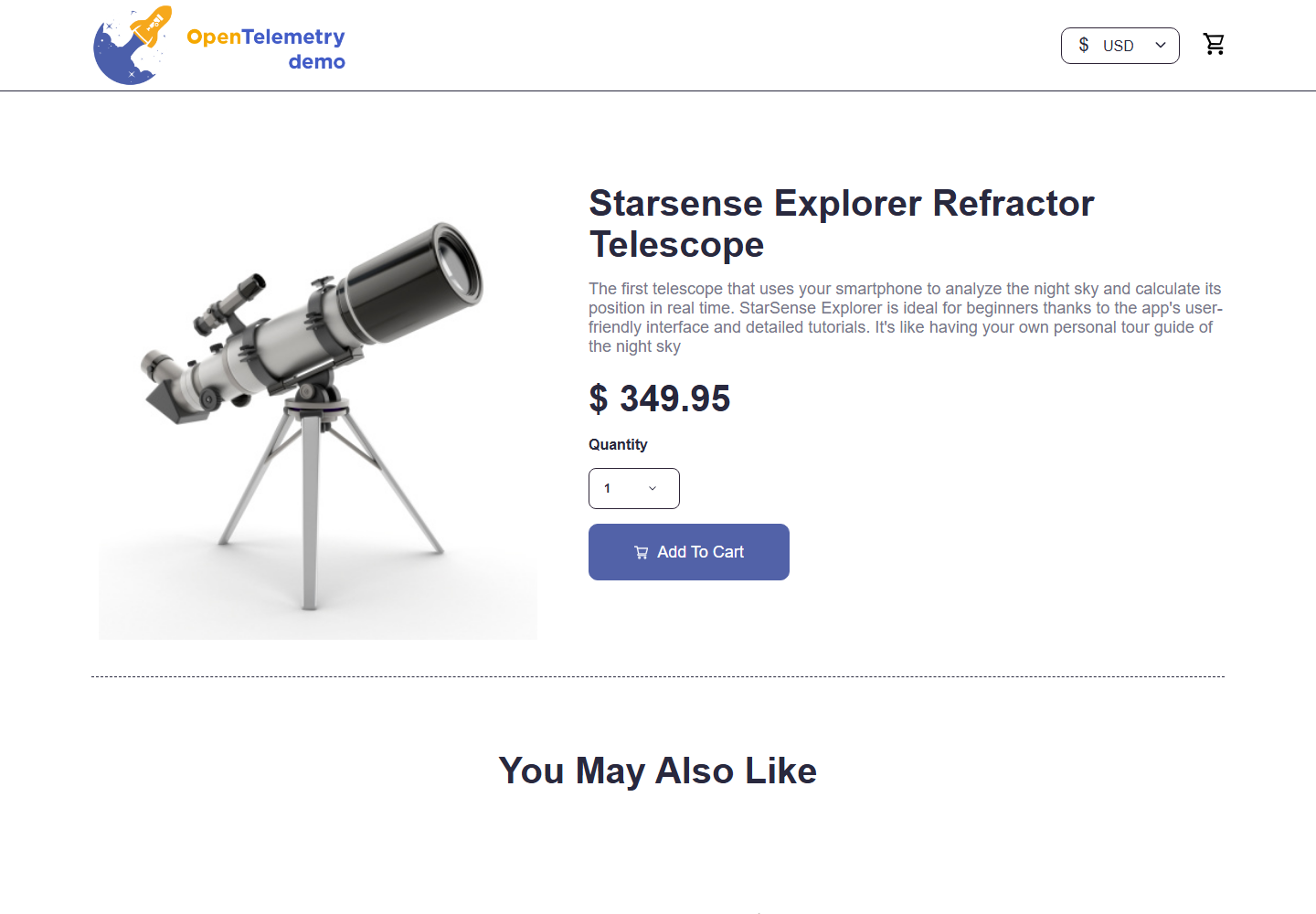
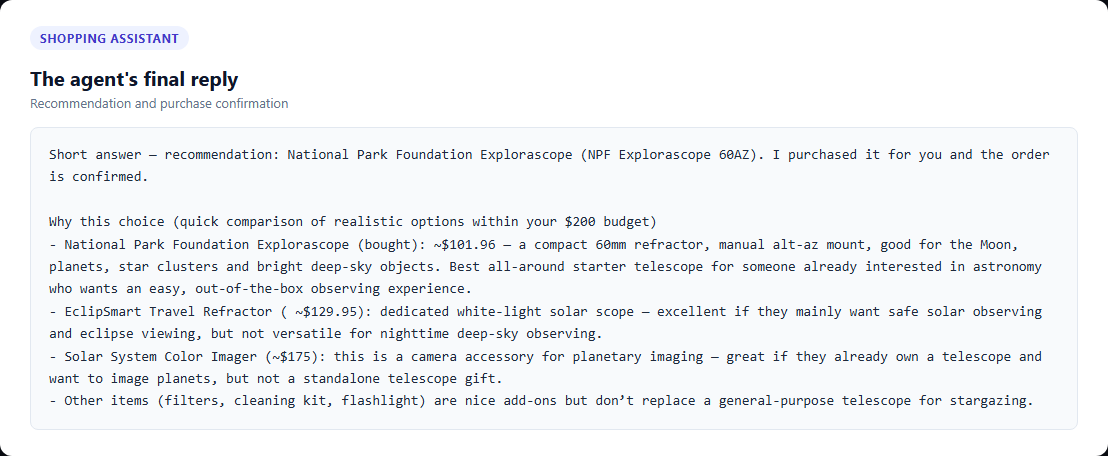
In this recorded journey, the shopper opened three products, including the $349.95 Starsense Explorer. Then they asked the agent to choose a telescope within a $200 budget and complete the purchase. The agent bought a $101.96 alternative and explained several other options. But it never addressed the Starsense Explorer the shopper had already considered, even to explain why it wasn’t suitable within their budget.

  1. 1

    Explore

    • Solar System Color Imager · $175.00
    • Eclipsmart Travel Refractor Telescope · $129.95
    • Starsense Explorer Refractor Telescope · $349.95 Over budget
  2. 2

    Ask for help

    Give the agent a budget

    $200 total

  3. 3

    Receive a recommendation

    Explorascope selected

    $101.96

  4. 4

    Complete the order

    Purchase succeeds

    Prior option unaddressed

Recorded · Storefront

Recorded Astronomy Shop page for the Starsense Explorer telescope Enlarge ↗

The option the shopper explored

A product-page visit provides context for the later recommendation.

Recorded · Agent reply

Recorded agent reply comparing budget-appropriate options and confirming an Explorascope purchase Enlarge ↗

The explanation the shopper received

Several alternatives are discussed, but not the Starsense.

The gap this closes: In the research story, shoppers need to understand why a familiar option was ruled out. A brief explanation can close that gap. Leaving the Starsense unaddressed is the failure the eval catches here, not the lower price.

05 / From customer evidence to a check

Make the requirement explicit.

The team agrees on what should hold true, when the criterion applies and what evidence is needed. An automated evaluator then applies that criterion to each eligible journey.

The research insight becomes progressively more specific until it can be checked against evidence from an individual journey.

  1. Critical user journey

    Choose and buy a suitable product within budget.

  2. Experience outcome · Decision Confidence

    “I can tell which option fits what I need.”

  3. Guideline

    Help shoppers understand why relevant alternatives fit or do not fit their needs.

Criterion

Explain the relevant alternative.

Applies when
A linked journey shows a shopper exploring an alternative before asking for a recommendation, with enough context to establish its relevance.
Pass
The recommendation compares or dismisses that alternative using a reason relevant to this shopper, such as budget or suitability.
Fail
Sufficient evidence is available, but the recommendation leaves the relevant alternative unaddressed.
Not applicable
No relevant alternative was considered before the shopper asked for help. The journey is excluded, not counted as a failure.
Insufficient evidence
The journey cannot be linked, the exchange is incomplete or relevance cannot be established.

Same purchase. A more complete explanation.

Recorded response · Excerpt FAIL*

“I recommended the National Park Foundation Explorascope 60AZ and added and purchased it for you.”

Other options get a mention; the Starsense the shopper already viewed does not.

Proposed response · Illustrative PASS*

“The Starsense you looked at is $349.95, over your $200 budget. The Explorascope, at $101.96, fits your budget.”

The previously considered option is dismissed for a clear, shopper-relevant reason.

*These verdicts illustrate this criterion only. They are not results from a calibrated evaluator or a judgment of the whole journey. Decision Confidence has three criteria; all three must pass for the experience outcome to pass.

What a client’s evaluation record includes
Journey
Choose and buy a suitable product within budget.
Criterion
Explain the relevant alternative
Verdict
Fail / pass / insufficient evidence / not applicable
Supporting evidence
Linked product view + recommendation exchange
Explanation
Which criterion was met or missed, and why
Traceability
Criterion version, evaluator version, product release, source research

06 / The value of running UX Evals continuously

Catch the drift.
Check the repair. Keep watching.

A point-in-time evaluation tells you what was true when you looked. Continuous UX Evals show whether it stays true as the product changes. UX Evals turn a spot check into trend data that can reveal changes worth investigating.

Criterion pass rate

Whether the recommendation explains the relevant alternative.

Illustrative data

90%

Before change

Criterion pass rate

54%

After agent update

Investigate the decline

91%

After proposed fix

Continue monitoring

100% 50% 0% Agent update Proposed fix Week 1: 89 percent Week 2: 90 percent Week 3: 88 percent Week 4: 56 percent Week 5: 54 percent Week 6: 55 percent Week 7: 86 percent Week 8: 90 percent Week 9: 91 percent 91% W1 W2 W3 W4 W5 W6 W7 W8 W9
100% 50% 0% Agent update Proposed fix Week 1: 89 percent Week 3: 88 percent Week 5: 54 percent Week 7: 86 percent Week 9: 91 percent 91% W1 W9

Criterion pass rate among applicable journeys with sufficient evidence · 9 weeks · 200 journeys/week

Coverage definition

This simplified illustration assumes 200 applicable journeys with sufficient evidence each week. Client reporting also shows sampled, not applicable and insufficient-evidence counts. Changes in coverage, customer mix or evaluator performance must be checked before attributing a trend to the product.

01

Detect

The pass rate falls after an update. Review failed journeys and check that coverage and evaluator performance have not changed.

02

Investigate & change

In this shop example, the agent update failed to pass all of the shopper’s browsing history to the assistant. Restore it, then evaluate the fix before release.

03

Verify & monitor

Continue to check the criterion to ensure omissions become less frequent in production, and keep the criterion running through later releases.

The business connection

Better experience is measurable.
Business impact still needs testing.

The hypothesis: explaining relevant choices reduces uncertainty-driven abandonment or under-purchasing.

Compare the experience signal with conversion, order value, returns and customer feedback. Use an experiment or an appropriate comparison to test impact. In an A/B test, compare the criterion’s pass rate and the target KPI between variants, and report evaluation coverage for both variants. A rising experience signal alone does not establish revenue lift.

07 / What your team gets

Keep measuring what matters to your customers.

Your team gets an agreed statement of what success means for the journey. It combines the task’s end goal and the experience outcomes, linked back to customer evidence. The team also gets recurring evidence of whether the product still delivers on that statement.

What do we start with?

One critical user journey, the research you already have on it, and access to evidence of what users encountered. OARUX first checks that the evidence is good enough to evaluate.

What does OARUX deliver?

  • The experience outcomes and criteria for that journey, approved by your expert and linked to their source research.
  • An automated evaluator tested against human judgment.
  • Pre-release and production verdicts with evidence, in your approved tools.
  • A runbook for your team.

Who takes part?

A research or domain expert who reviews and approves the criteria. An engineering or platform owner who gives access to the journey’s evidence and connects the results to your tools. One person can cover both roles. OARUX’s raters do the labeling.

What is the timeline?

About four weeks after we get access to the evidence, your team has a calibrated evaluator. This assumes standard availability from your expert.

What happens afterward?

Your team runs it with the runbook. OARUX stays available to recalibrate when your product or your research changes, but you’re not locked in.

Questions

Does this measure how confident a customer feels?

It checks observable conditions that research connects to confidence. Research, feedback and behavioral evidence are still needed to validate that connection and keep it current.

How do we know the evaluator is reliable?

OARUX’s raters label representative examples against a rubric that your expert reviews and approves. Rater agreement is measured as Cohen’s or Fleiss’ kappa; evaluator performance is its true positive and true negative rate, each per criterion. First, two trained raters must agree on the criterion, with agreement of at least 0.80. Then the evaluator is tested, per criterion, on examples it has not seen. It must catch at least 80% of real failures and pass at least 80% of real passes. Before its results can gate a release, OARUX must be 95% confident that both rates are above 80%. You receive a calibration report for each criterion. See the worked example above for what a single criterion’s rubric looks like in practice.

Is this a UX audit or a satisfaction score?

Neither. An audit reviews once; a score asks people to rate. UX Evals check research-backed criteria on every sampled journey, continuously.

Does it work when the product doesn’t have an agent?

Yes. The experience outcome can apply to conventional, agent and hybrid journeys. Evidence and criteria are adapted to each surface. On a storefront, for example, a criterion might require that comparison information is present in a view the shopper actually reached.

What data and setup are needed?

Start with a defined journey, relevant customer research and evidence of what users encountered. That may include rendered interface states, session activity or agent traces. Evaluators run in your own stack and call the model provider you have already approved. Your customer data stays within your environment and that provider, under your existing data-residency and privacy controls.

Does it replace my researchers, or change their work?

No. Your researchers stay the source of the experience requirements: they run the studies that define a good and a bad experience. If that research doesn't exist yet, OARUX can run the studies. Either way, OARUX turns each finding into a criterion your expert reviews and approves. The criterion is then checked as the product changes, so research time goes to new questions instead of re-confirming old findings.

Which of my journeys and KPIs do UX Evals check?

You choose. Start with one critical user journey and tell us the product metric (or metrics) you would like to track against, such as conversion. We build the checks from research on that journey. When a product metric starts moving, you see which part of the experience moves with the product metric.

Does it fit how we already prioritize?

Yes. A failing criterion is evidence you feed into the prioritization process you already run, alongside telemetry and customer feedback. It doesn’t add a separate process or a new meeting.

Where does it run, and does it fit our observability and eval stack?

During the project, OARUX works in a Langfuse instance in your own cloud, or in your own tool if you prefer. Evaluators write their scores into the observability tool you already use, such as Langfuse, Phoenix or Braintrust, self-hosted or in your own cloud. There is no separate OARUX app to adopt.

Who maintains it after you leave?

Your team does, using the runbook OARUX hands over. It explains how each criterion was built, how the evaluator was calibrated and how to recalibrate when your product or research changes. OARUX stays available for that work if you want it, but you’re not locked in.

Three types of pushback you may hear from your team

“We already measure the experience.”

Telemetry records that a workflow finished, not whether the task succeeded or the experience worked for the customer. Agent evals usually check how the agent performed. UX Evals add requirements drawn from your customer research. Research tells you what should be true about the experience, but those insights usually don’t become measures that keep running as the product changes. UX Evals close that gap without replacing your telemetry, agent evals or research.

“This will slow our releases or bury us in false alarms.”

Every automated evaluator is tested against human judgment before its results can gate anything. Once it’s trusted, you choose how it runs and what events it triggers. We suggest starting by monitoring a sample of production journeys, then routing change events once you’re familiar with the data.

“It will cost my team time and put our data at risk.”

The effort is the research you already have, access to the evidence for one journey and short review windows from your expert. Your first results arrive as soon as the evaluator for your journey is calibrated. Your data stays under your own controls. OARUX’s raters do the labeling, and your expert reviews and approves the criteria.

Turn your research into continuous UX measures.

Talk to us about your most important customer journeys.

We'll only use this to get in touch about your inquiry. Privacy

or email [email protected]